
DevAgent WBR — Hourly Bookings & Appointments
Sell appointments, sessions and hourly rentals with single-slot or multi-slot booking, recurring or manual availability, capacity protection and a WooCommerce checkout and order workflow.
Use code HOURLYAPP100 at checkout. Limited to the first 100 customers. Renews at €39.99/year.
Single slot or multiple slots per booking
Weekly schedules with exceptions or manual slots
Independent configuration for Booking Variable variations
Up to 48 selected slots from the same local date
Capacity, buffers and server-side revalidation
Annual single-site license · Requires DevAgent WBR 1.2.7+ · WooCommerce 8.5+ · WordPress 6.8+ · PHP 8.1+
VIDEO TUTORIALS · DEVAGENT WBR HOURLY
Learn Hourly Bookings step by step
Explore our free 10-part YouTube tutorial series. Learn to create appointment products, configure recurring or manual time slots, control capacity and buffers, select multiple slots, set prices and manage WooCommerce orders and appointments.
Use a booking model built around appointment times
DevAgent WBR handles its regular day/night date_range workflow. Hourly Bookings & Appointments adds a separate time_slot mode for products that need a precise start time, one or more appointment slots and capacity control at the time-slot level.
Single slot per booking
Use one date and one appointment time when the customer should reserve a single session, consultation, class, service visit or rental period.
One selected slot per booking
WooCommerce Quantity consumes capacity in that slot
Selecting another slot replaces the previous selection
Multiple slots per booking
Allow one booking to contain several times from the same local date when the customer needs a longer or split reservation.
Consecutive or non-consecutive slots
Up to 48 selected slots per booking
Capacity is checked across the complete selected set before new holds are written
The selected set stays together as one booking through cart, checkout and order data
See multiple slots in action: How it works · Try the City Bike demo · Watch the video ↗
Configure schedules, capacity and pricing per product or variation

Choose single or multiple slots
Set Single slot per booking or Multiple slots per booking independently for each Booking Simple product or compatible variation.

Weekly schedule + exceptions
Create recurring weekday availability with one or more time windows, then close a specific date or replace its normal weekly hours when needed.

Manual slots
Create explicit local date-and-time availability for one-off sessions, irregular schedules or dates that do not follow a weekly pattern.

Capacity and buffers
Set slot capacity, minimum booking advance, maximum booking horizon, buffer before and buffer after. WooCommerce Quantity consumes the same amount of capacity in every selected slot.

Fixed or duration-unit pricing
Use the WooCommerce product or variation price as a fixed price per selected slot, or calculate pricing from accumulated selected duration and a configured duration unit.

Variation-level control and slot colors
Each compatible variation keeps its own Hourly schedule, duration, capacity, pricing and selection settings. Primary, Secondary and Text colors can also be configured per product or variation for the frontend slot selector.
Offer one precise time or several times in one booking
Single-slot booking
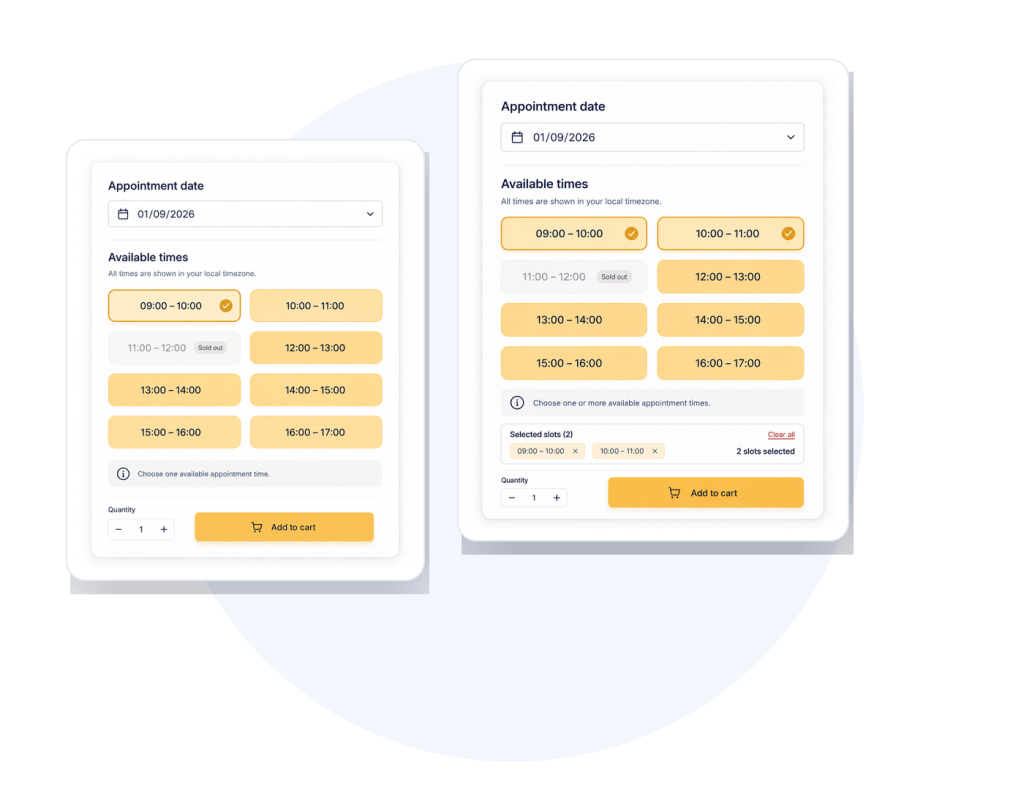
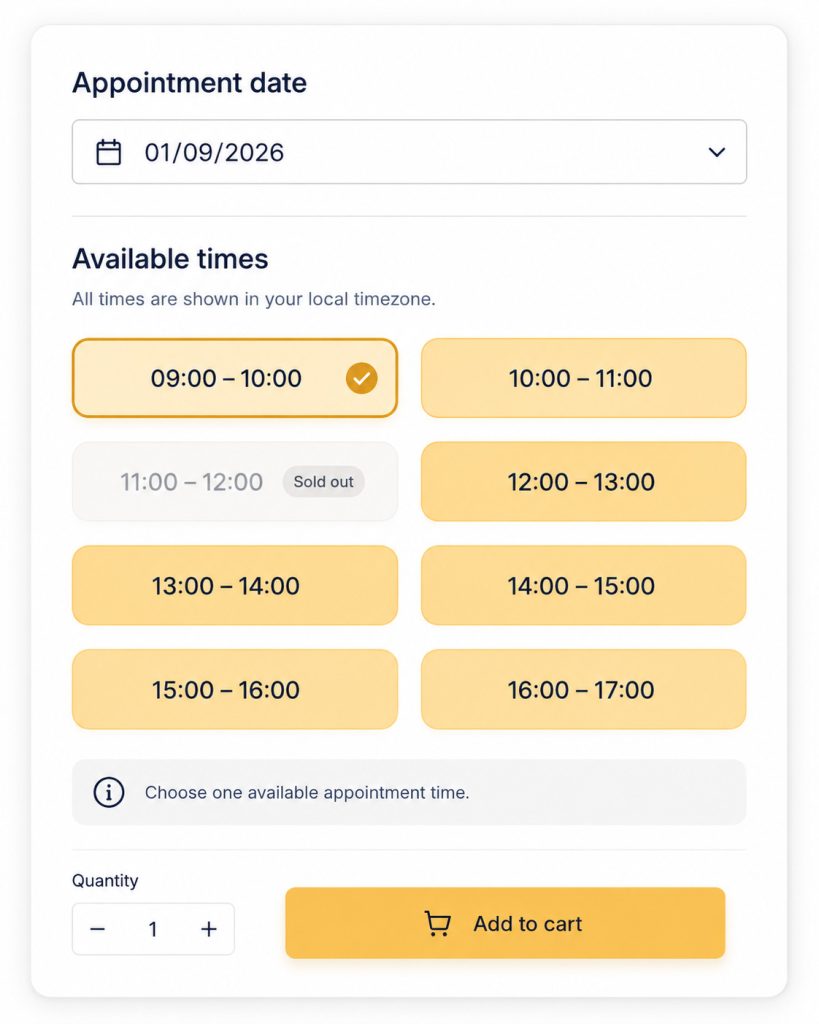
Customers choose a date and one available appointment time. Unavailable capacity can appear as Sold out, and the selected slot remains connected to WooCommerce Quantity and Add to cart.
Remaining capacity (Hourly 1.2.3): When enabled under Settings > Hourly & Appointments, available times show the exact remaining quantity for slots with capacity greater than one. This is separate from Base’s Date Range availability display.
Real frontend: Single slot per booking with selected, available and sold-out states.
Multiple-slots booking
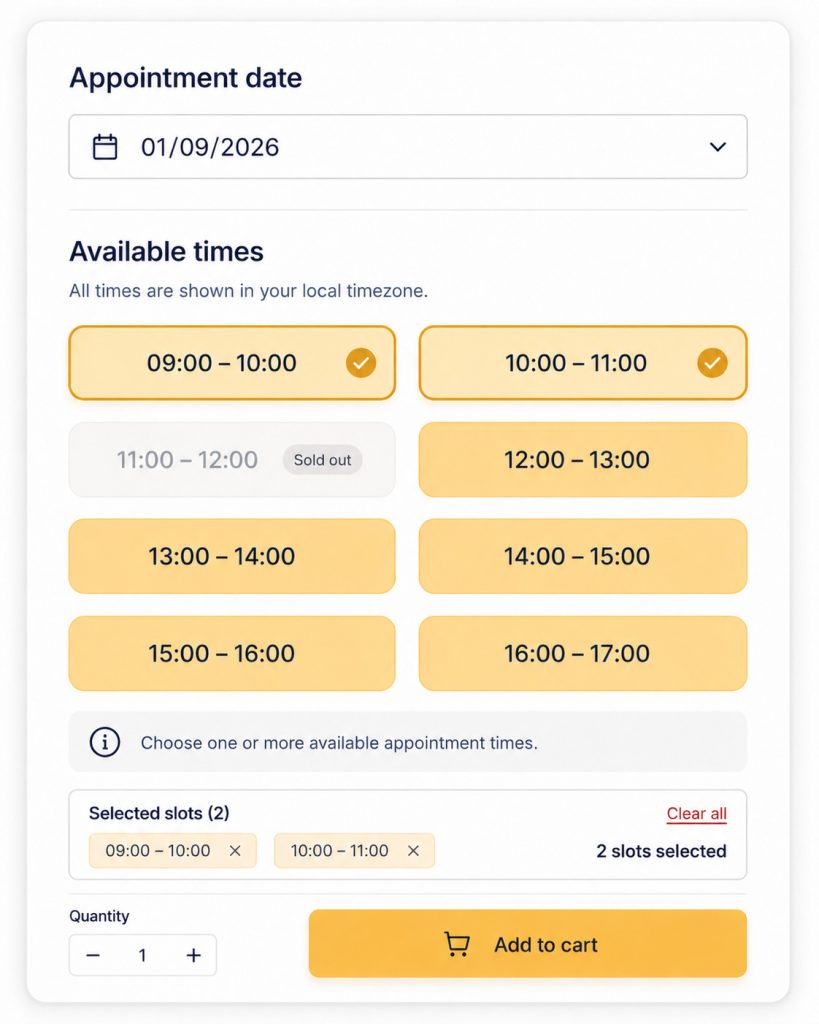
Customers can select one or more available times from the same date. The selection can contain consecutive or non-consecutive slots and is shown as one booking before Add to cart.
Real frontend: Multiple slots per booking with selected-slot summary.
Define recurring availability or explicit appointment times
Weekly schedule
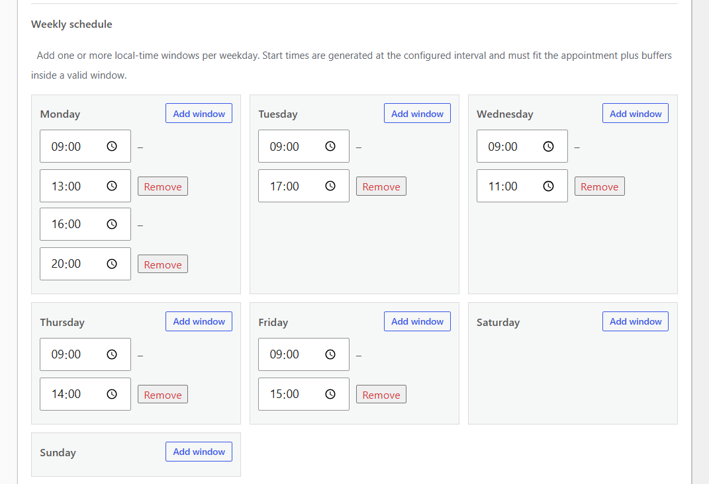
Add one or more local-time windows to each weekday. Hourly generates valid start times from the configured interval and checks that appointment duration and buffers fit inside an allowed window.
Real admin screen: Weekly schedule with multiple weekday windows.
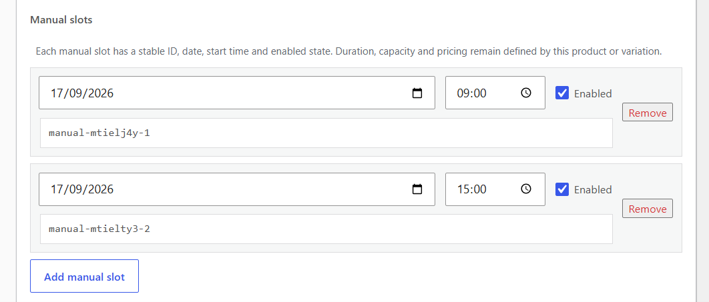
Manual slots
Create explicit local dates and start times when availability is irregular. Duration, capacity, buffers and pricing remain defined by the product or variation.
Real admin screen: Manual slots with stable IDs and enabled state.
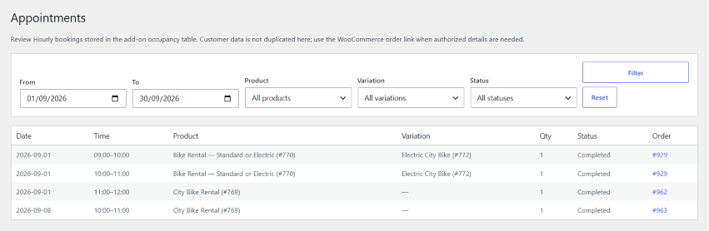
Review Hourly bookings from one administration view
DevAgent WBR → Appointments lists Hourly reservations backed by WooCommerce orders and provides filters for date, product, variation and status. Customer personal data remains in WooCommerce instead of being duplicated in the Hourly occupancy table.
Real admin screen: Hourly Appointments with date, product, variation and status filters.
How Hourly Bookings & Appointments works
Choose the Hourly booking mode
Assign Hourly slots / appointments to the compatible DevAgent WBR product.
Configure selection, time, capacity and pricing
Choose Single or Multiple slots, then set duration, start interval, capacity, booking limits, buffers and the price model.
Define the availability source
Use Weekly schedule + exceptions for recurring availability or Manual slots for explicit local dates and times.
Let the customer choose a date and slot or slots
Hourly returns valid times for the selected product or variation and shows the configured availability on the WooCommerce product page.
Revalidate and persist through WooCommerce
Availability, capacity and price are checked again on the server. The booking persists through cart, checkout and order data, and confirmed occupancy is linked to the WooCommerce order.
Booking quantity protection (Hourly 1.2.3): If the requested quantity exceeds available capacity or no valid time is selected, Add to cart is blocked with a clear warning. Quantity changes refresh availability, and the server checks capacity again in the cart and at checkout.
Use Hourly for appointments, sessions and hourly rentals
Professional consultations
Book one-to-one sessions for consultants, coaches, advisors or other appointment-based services.
Classes and workshops
Offer fixed class times or allow customers to select several same-day sessions when the product is configured for multiple slots.
Studios, rooms and equipment
Sell hourly use of studios, rooms, workspaces or equipment with capacity controlled for each selected slot.
Technical and field services
Publish service windows for inspections, installations or other time-based visits using recurring schedules or manually created slots.
One annual license for one WordPress website
Base plugin required
DevAgent WBR — Hourly Bookings & Appointments is a commercial add-on for DevAgent WBR. The current license configuration is for one site, one year, with annual recurrence.
The license controls update delivery and support eligibility. Missing, inactive or expired license status does not disable the installed Hourly booking runtime.
Use code HOURLYAPP100 at checkout. Limited to the first 100 customers. Renews at €39.99/year.
Renewal price
€39.99/year
The annual license is valid for one website and includes product updates and support while active.
Annual single-site license · Promo code required · Renewal price €39.99/year
Add hourly booking without replacing the base plugin

DevAgent WBR is required
Hourly Bookings & Appointments requires DevAgent WBR 1.2.7+. The base plugin continues to provide its normal date_range booking workflow, while Hourly adds the separate time_slot mode.
Dynamic Pricing 1.0.1 can coexist
Dynamic Pricing 1.0.1 can be active alongside Hourly, but its rules remain limited to date_range bookings and do not modify Hourly time_slot prices.
Frequently asked questions
Does Hourly Bookings & Appointments work without DevAgent WBR?
No. It requires DevAgent WBR — Rentals and Bookings for WooCommerce 1.2.7 or higher and WooCommerce.
Can I limit a product to one appointment time?
Yes. Choose Single slot per booking so the booking contains one date, one slot and WooCommerce Quantity.
Can customers select several appointment times?
Yes. Choose Multiple slots per booking. One booking can contain up to 48 selected slots from the same local date.
Do multiple slots have to be consecutive?
No. They can be consecutive or non-consecutive, but all selected slots in the booking must belong to the same local date.
How does WooCommerce Quantity affect capacity?
Quantity consumes that amount of capacity in every selected slot. In a multi-slot booking, Hourly checks the complete selected set before creating new holds.
Can Booking Variable products use Hourly?
Yes. The variable product owns the Hourly booking-mode assignment, while each compatible variation keeps its own schedule, duration, capacity, pricing, selection behavior and slot colors.
Can I customize the slot colors?
Yes. Primary, Secondary and Text colors can be configured per product or variation.
Does Dynamic Pricing 1.0.1 change Hourly prices?
No. Dynamic Pricing 1.0.1 remains scoped to date_range bookings and does not modify Hourly time_slot prices.
Does an expired license stop bookings?
No. The license manages update delivery and support eligibility; it does not act as a booking feature gate.
Add hourly booking workflows to your DevAgent WBR products
Create recurring schedules or manual appointment times, offer single or multiple slots, protect capacity and keep booking data connected to the WooCommerce cart, checkout and order workflow.
Use code HOURLYAPP100 at checkout · First 100 customers · Renews at €39.99/year · Annual single-site license
