
DevAgent WBR — Dynamic Pricing for WooCommerce Bookings
Create pricing rules for rental and booking products powered by DevAgent WBR. Adjust the price of each billable day or night using exact date ranges, weekdays, total booking duration and rule priority.
Use code DYNAMIC100 at checkout. Limited to the first 100 customers. Renews at €39.99/year.
Annual single-site license · Requires DevAgent WBR 1.1.0+ · WordPress 6.8+ · PHP 8.1+ · WooCommerce 8.5+
Rules for exact date ranges and weekdays
Fixed prices, percentage adjustments and fixed per-unit adjustments
Updates and support while the annual license is active
Minimum and maximum booking duration conditions
Compatible with Booking simple and Booking variable products
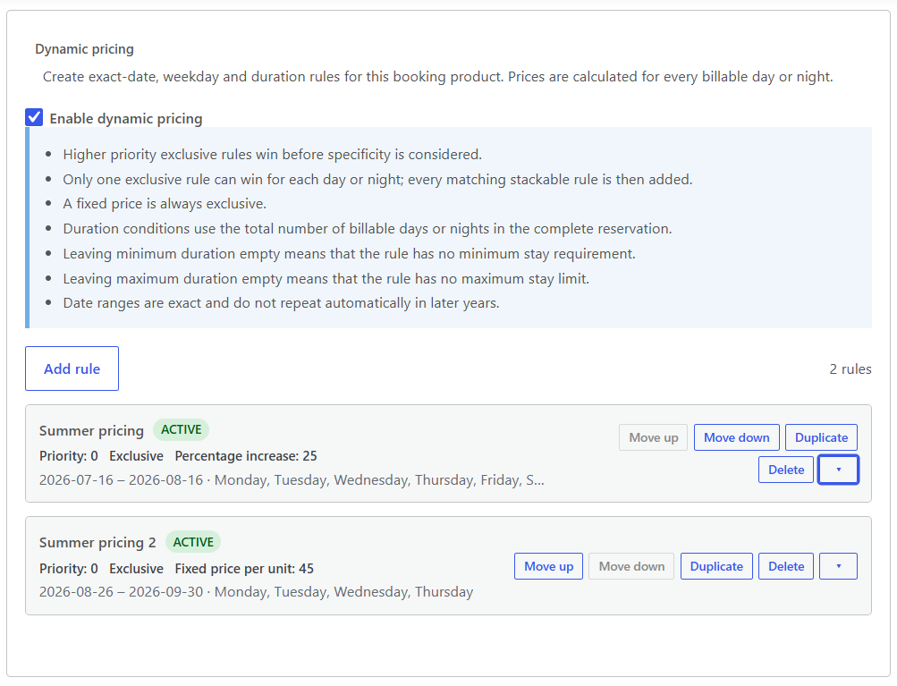
Match booking prices to real operating periods
A single base price does not fit every rental or booking business. Peak dates, weekends and longer reservations can require different rates, but repeatedly editing WooCommerce product prices is difficult to manage and easy to forget.
DevAgent WBR — Dynamic Pricing keeps the WooCommerce product price as the starting point and applies defined rules to the billable days or nights in each booking.
Rules that follow booking conditions
Define rules for exact date ranges.
Apply conditions to selected weekdays.
Set minimum or maximum booking duration.
Use priority to resolve overlapping rules.
Combine selected adjustments through exclusive or stackable modes.
What it does not grant
One base price for every date.
Manual price changes for busy periods.
No weekday-specific adjustment.
No duration condition for longer or shorter bookings.
Limited control when several pricing conditions overlap.
Build pricing rules around dates, weekdays and duration

Exact date ranges
Create rules with a defined start and end date for high season, holidays, events or other periods. Dates are exact and include the selected start and end dates.

Weekday conditions
Apply a rule only to selected weekdays, such as Saturday and Sunday, or combine weekdays with a date range.

Booking duration
Use minimum and maximum duration conditions based on the total number of billable days or nights in the reservation.

Flexible price effects
Set a fixed price per billable unit, apply a percentage adjustment or add a fixed adjustment per day or night.

Priority and combination modes
Use rule priority to determine which exclusive rule wins. Allow selected stackable rules to accumulate when the pricing setup requires more than one adjustment.

Simple and variable booking products
Configure rules for Booking simple products or for individual variations in Booking variable products. Rules belong to the compatible product or variation where they are created.
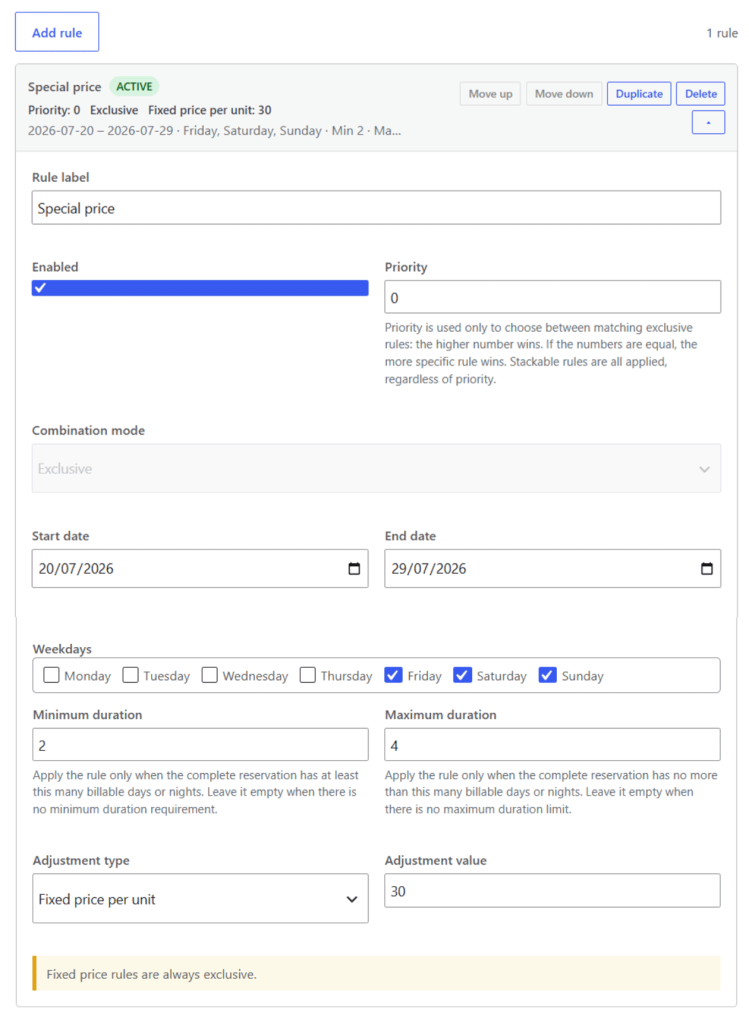
REAL WORDPRESS ADMIN SCREEN
The editor keeps the rule label, active state, priority, combination mode, exact dates, weekdays, duration conditions and adjustment values together.
Real DevAgent WBR administration screen showing booking occupancy, blocked dates and capacity controls.
How pricing is calculated
Start from the WooCommerce price
The product or selected variation provides the base price for each billable day or night.
Evaluate the booking context
The add-on checks the selected dates, weekday conditions, total booking duration and the rules configured for that product or variation.
Resolve matching rules
Priority determines the winning exclusive rule. Stackable rules can be added when their conditions also match. A fixed price per unit is always exclusive.
Calculate each billable unit
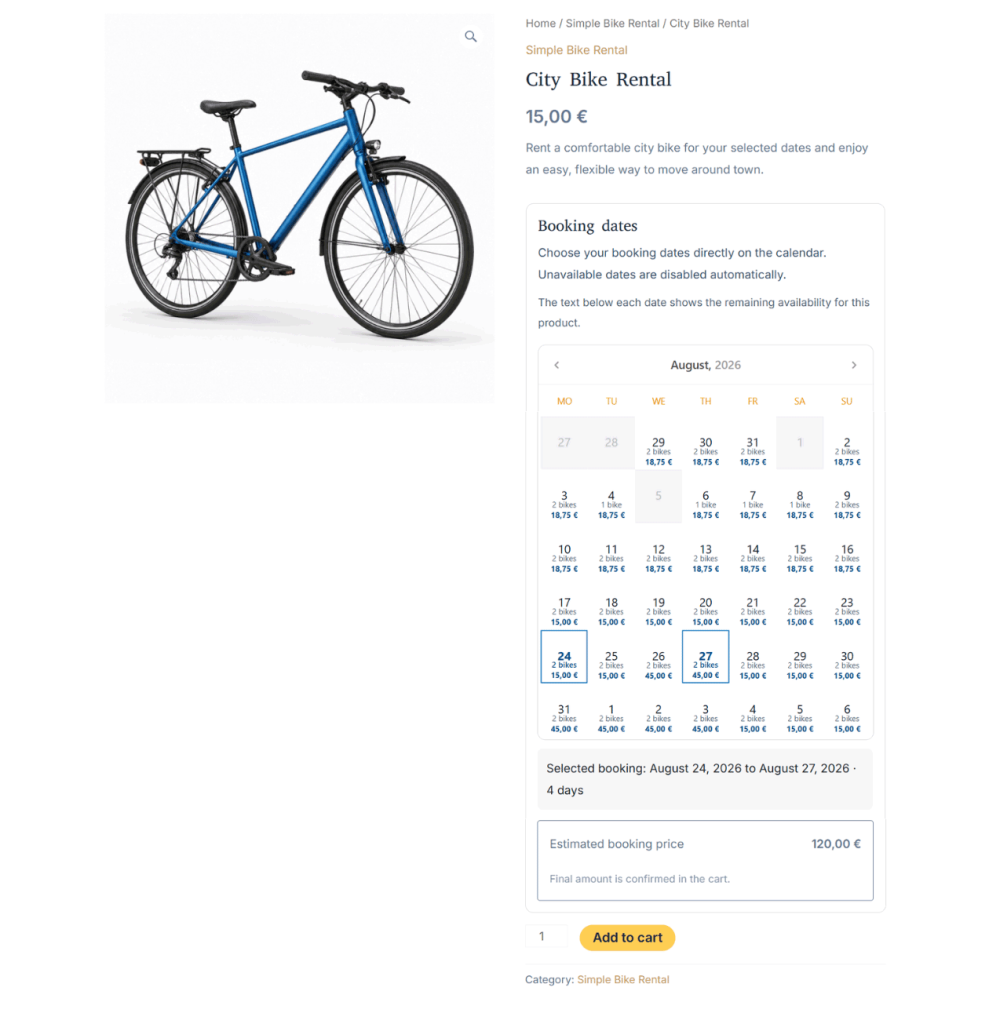
The add-on calculates the relevant price for every billable day or night, then sends the resulting booking price through the WooCommerce cart and checkout workflow.
ILLUSTRATIVE EXAMPLE
A five-night booking crosses two pricing periods:
- 28–30 June: 3 nights × €50 = €150
- 1–2 July: 2 nights × €70 = €140
- Booking total: €290
The rate is not forced across the entire booking when different billable nights match different rules.
Pricing scenarios for rental and booking businesses
Peak-season rates
Set a different price for a defined summer, holiday or event period.
Weekend adjustments
Increase or decrease the price for selected weekdays without changing the product base price for the rest of the week.
Longer-booking incentives
Apply a percentage or fixed adjustment when the total reservation reaches a defined minimum duration.
Variation-specific pricing
Give each compatible variation its own rules when different models, sizes or rental options require different prices.
Requirements and scope
ILLUSTRATIVE EXAMPLE
Required environment
WordPress 6.8 or higher
PHP 8.1 or higher
WooCommerce 8.5 or higher
DevAgent WBR — Rentals and Bookings for WooCommerce 1.1.0 or higher
WooCommerce and DevAgent WBR installed and active
INCLUDED IN VERSION 1.0.0
Current product scope
Rules for Booking simple products
Rules for individual Booking variable variations
Exact date ranges
Weekday conditions
Minimum and maximum booking duration
Rule priority
Exclusive and stackable modes
Fixed price, percentage and fixed per-unit adjustments
Price calculation across different billable days or nights
WooCommerce cart and checkout integration through DevAgent WBR
NOT INCLUDED IN VERSION 1.0.0
Outside the current scope
Hourly booking prices
Automatically recurring annual date rules
Global rules for all products, categories or tags
Occupancy-based or inventory-based pricing
User-role, coupon or advance-booking conditions
Parent-product rule inheritance for variations
Product-wide presets, bulk editing or import/export
Product-wide presets, bulk editing or import/export
Dedicated multi-currency integration
Rules are configured for each compatible product or variation. Review the documentation before purchase when your pricing workflow depends on a feature listed outside the current scope.
One annual license for one WordPress website
Base plugin required
DevAgent WBR — Dynamic Pricing is an add-on. It requires the free DevAgent WBR plugin and does not replace WooCommerce.
Use code DYNAMIC100 at checkout. Limited to the first 100 customers. Renews at €39.99/year.
Renewal price
€39.99/year
The annual license is valid for one website and includes product updates and support while active.
Annual single-site license · Promo code required · Renewal price €39.99/year
Product information before and after purchase
Documentation
Review installation, license activation, rule configuration, frontend pricing and troubleshooting.
WordPress.org
Download the current public release of the required base plugin.
Frequently asked questions
Does Dynamic Pricing work without DevAgent WBR?
No. It is an add-on for DevAgent WBR and also requires WooCommerce.
Which booking products can use pricing rules?
Version 1.0.0 supports Booking simple products and individual variations in Booking variable products provided by DevAgent WBR.
Can I change prices by season or exact dates?
Yes. Create a rule with an exact start and end date. The dates are inclusive and do not repeat automatically in future years.
Can I use weekday pricing?
Yes. A rule can apply only to selected weekdays and can combine weekday conditions with a date range or booking-duration condition.
Can I create discounts for longer bookings?
Yes. Use a minimum booking duration together with a percentage or fixed adjustment. Duration is evaluated against the total number of billable days or nights.
What happens when several rules match?
Priority resolves competing exclusive rules. Selected stackable rules can accumulate. A fixed price per billable unit is always exclusive.
Can one booking use different prices on different dates?
Yes. The add-on evaluates each billable day or night, so a booking that crosses pricing periods can use different rates within the same reservation.
What does the annual license include?
The single-site annual license includes product updates and support while active. The public launch offer is €29.99 for the first year with code DYNAMIC100, limited to the first 100 customers. The renewal price is €39.99/year.
Add flexible pricing to your DevAgent WBR booking products
Create rules for dates, weekdays and booking duration while keeping the familiar WooCommerce product, cart and checkout workflow.
Use code DYNAMIC100 at checkout · First 100 customers · Renews at €39.99/year · Annual single-site license
